
Updated July 28, 2026. Amazon prices, sellers, availability, and package variants can change. Confirm that the selected listing includes the CFS or AMS lite before checkout.
Quick answer
The Bambu Lab A1 is the better budget 3D printer for most beginners. It has a substantially larger build volume, a more polished software ecosystem, excellent automatic calibration, quiet operation, and an easier path from finding a model to starting a reliable print.
Choose the Creality K2 SE Combo instead when you specifically want CoreXY motion, higher acceleration, enclosed desiccant-based filament storage, root access, or the ability to expand from four to as many as 16 color or material inputs. The K2 SE Combo is genuinely capable of multi-material printing, but there are important compatibility limits explained below.
Check the variant before buying: The K2 SE requires a CFS for automatic multicolor and multi-material switching. The A1 requires an AMS lite. Amazon may show printer-only and Combo variants on the same listing.
Check Bambu A1 / A1 Combo on Amazon
Creality K2 SE vs Bambu Lab A1: quick verdict
| Category | Winner | Why |
|---|---|---|
| Best overall for beginners | Bambu Lab A1 | More polished setup, slicer, app, model ecosystem, and automatic workflow |
| Motion system and acceleration | Creality K2 SE | CoreXY layout and up to 20,000 mm/s² advertised acceleration |
| Build volume | Bambu Lab A1 | 256 mm cube gives about 45% more nominal volume |
| Color/material expansion | Creality K2 SE Combo | Up to four CFS units and 16 filament inputs versus one four-slot AMS lite |
| Software freedom | Creality K2 SE | Root access, expert settings, and Fluidd support |
| Software simplicity | Bambu Lab A1 | Bambu Studio, Bambu Handy, and MakerWorld form a smoother beginner workflow |
| Filament protection | Creality CFS | Enclosed spool storage with desiccant and humidity display; it is not an active dryer |
| Best default recommendation | Bambu Lab A1 Combo | The safest pick when you want to print rather than manage a printer |
Manufacturer maximum-speed figures are useful for comparing hardware, but they do not represent the speed every model should use.
Creality K2 SE vs Bambu Lab A1 specifications
| Feature | Creality K2 SE / Combo | Bambu Lab A1 / Combo |
|---|---|---|
| Motion system | CoreXY | Bed slinger / Cartesian |
| Build volume | 220 × 215 × 245 mm | 256 × 256 × 256 mm |
| Maximum advertised speed | 500 mm/s | 500 mm/s |
| Maximum advertised acceleration | 20,000 mm/s² | 10,000 mm/s² |
| Hotend maximum | 300°C | 300°C |
| Bed maximum | 100°C | 100°C |
| Extruder | Dual-gear direct drive | Direct drive with hardened-steel extruder gears |
| Build surface | Epoxy-resin plate | Textured PEI spring-steel plate |
| Automatic calibration | Auto leveling, fan calibration, input shaping | Z offset, bed leveling, vibration, flow dynamics, motor-noise calibration |
| Multicolor system | CFS; included only with Combo variant | AMS lite; included only with Combo variant |
| Maximum automatic inputs | 16 with four CFS units | 4 with one AMS lite |
| Multi-material capable | Yes, among compatible CFS materials | Yes, among compatible AMS lite materials |
| TPU through material system | No; direct feed required | Only specifically approved AMS-compatible flexible filament; otherwise direct feed |
| Filament storage | CFS enclosure, desiccant, humidity display; no heater | Open AMS lite spool holders; no drying enclosure |
| Camera | Optional AI camera | Basic monitoring camera included |
| Connectivity | Wi-Fi, USB, cloud, LAN control | Wi-Fi, microSD, cloud, LAN-only mode |
| Primary software | Creality Print, Creality Cloud, Fluidd | Bambu Studio, Bambu Handy, MakerWorld |
CoreXY vs bed slinger: the biggest hardware difference
The K2 SE is the more ambitious motion platform. Its CoreXY system keeps the print bed from rapidly moving forward and backward during every Y-axis move. That generally gives CoreXY printers an advantage in acceleration, frame control, and future enclosure design. Creality backs that up with a rigid metal frame and an advertised acceleration limit of 20,000 mm/s².
The A1 is a bed slinger. Its print bed moves along the Y axis while the toolhead moves along X and Z. That design is simpler and less expensive, but a heavy print moving back and forth can become a limitation at extreme acceleration. Bambu compensates with a stiff frame, vibration calibration, active flow-rate compensation, and very polished profiles.
This is why the hardware winner and the practical winner are not automatically the same. The K2 SE has the more performance-oriented architecture. The A1 has the more proven beginner workflow.
For a deeper explanation of the tradeoff, read our CoreXY vs bed slinger guide.
The Bambu Lab A1 has much more build volume
The A1 provides a 256 × 256 × 256 mm build area. The K2 SE provides 220 × 215 × 245 mm. That difference looks modest when written as three dimensions, but it adds up: the A1 offers about 45% more nominal build volume.
The extra room matters for:
- helmet sections and cosplay parts;
- large organizers and household projects;
- classroom and homeschool models;
- printing more pieces in one batch;
- avoiding unnecessary cuts and glued seams.
For many buyers, build volume is more useful than another headline acceleration number. A model that does not fit cannot be rescued by faster motion.
Speed and print quality
Both manufacturers advertise a maximum toolhead speed of 500 mm/s. The K2 SE doubles the A1’s stated acceleration limit—20,000 versus 10,000 mm/s²—but that does not mean every K2 SE print finishes in half the time.
Real print time depends on several constraints:
- the length of each toolpath;
- hotend volumetric flow;
- part cooling;
- layer height and nozzle size;
- material behavior;
- the number of color or material changes;
- slicer profiles and quality targets.
Creality identifies roughly 300 mm/s as a typical speed for reliable K2 SE quality. The A1’s strongest print-quality feature is its active flow-rate compensation, which measures nozzle pressure and adjusts extrusion automatically. The K2 SE uses a vibration sensor and input shaping to reduce ringing.
Our practical judgment: the K2 SE has the higher motion-performance ceiling, while the A1 is the safer recommendation for buyers who care more about consistent results with minimal profile work.
Our fastest 3D printers guide explains why maximum speed is only one part of the equation.
Multicolor and multi-material printing
Yes—the K2 SE Combo is multi-material capable
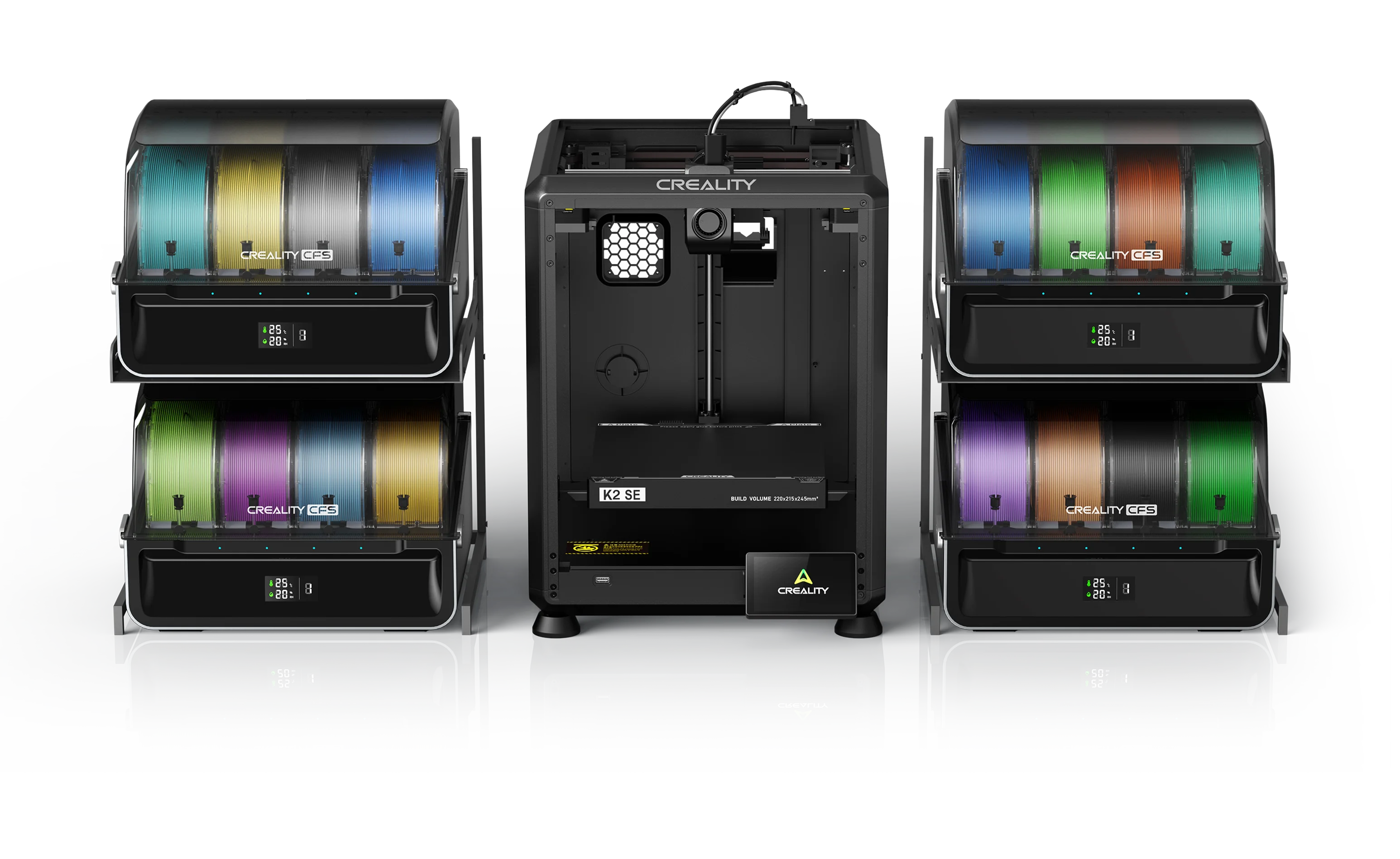
Creality explicitly designed the K2 SE and CFS workflow for both multicolor and multi-material printing. The CFS can automatically switch among compatible rigid filaments, making it possible to use different colors, a contrasting support-interface material, or materials selected for different portions of a model.
That statement needs a few honest qualifiers.
It is a single-nozzle multi-material system
The K2 SE does not have independent toolheads. Each material travels through the same nozzle. The printer unloads one filament, loads another, purges the transition, and continues printing. The A1 Combo works on the same basic principle with the AMS lite.
That means both systems:
- create some purge and prime waste;
- add time for every material change;
- work best when the materials have compatible nozzle temperatures;
- need materials that adhere to each other appropriately;
- are not equivalent to a dual-extruder or tool-changing printer.
What multi-material printing is actually useful for
For budget printers, the most useful multi-material applications are often more practical than mixing exotic plastics:
- PLA with a PETG support interface to make supports separate more cleanly;
- PETG with a compatible support material when the profile and material combination are validated;
- different colors or material properties within one model;
- automatic backup spools for long prints;
- keeping frequently used materials loaded and ready.
The K2 SE has the stronger expansion path
One CFS holds four spools. The K2 SE can connect as many as four CFS units for up to 16 filament inputs. The A1 supports one AMS lite, so it tops out at four automatic inputs.
The A1 Combo is still multi-material capable
The A1 Combo’s AMS lite can switch among four compatible filaments. It is especially useful for multicolor models, support-interface materials, and automatic spool backup. The limitation is expansion: the A1 series supports only one AMS lite.
The A1 nevertheless has an important advantage for ordinary users: Bambu Studio, MakerWorld, RFID presets for Bambu filament, and the AMS lite workflow are tightly integrated. Four reliable inputs are more valuable than 16 theoretical inputs when a buyer never intends to purchase three additional material systems.
CFS vs AMS lite
Creality CFS advantages
- enclosed spool compartment;
- desiccant-based moisture control;
- temperature and humidity display;
- automatic filament identification with Creality RFID spools;
- automatic spool relay;
- runout and tangle monitoring;
- expansion to four CFS units.
AMS lite advantages
- simple, visible filament path;
- easy access when clearing a jam;
- very strong integration with Bambu Studio and MakerWorld;
- automatic RFID synchronization with Bambu filament;
- automatic spool backup;
- a mature, widely used A-series workflow.
Neither system actively dries filament
The CFS enclosure is better at slowing moisture absorption than the open AMS lite, but its official drying method is desiccant. It is not a heated dryer. The AMS lite also does not actively dry filament.
If PETG is already wet, putting it inside either system does not reverse the problem. Dry it first, then use protected storage. See our guides to filament dryers vs dry boxes and how to dry filament correctly.
Setup, calibration, software, and everyday use
Bambu Lab A1: the easier ownership experience
The A1’s main advantage is not one specification. It is how the whole system fits together. Automatic Z offset, bed leveling, vibration calibration, flow dynamics, a touchscreen, Bambu Studio, Bambu Handy, and MakerWorld reduce the number of decisions a new owner has to make.
You can find a compatible MakerWorld model, choose a tested profile, send it to the printer, and monitor it from the app. That is a major reason the A1 remains one of the easiest printers to recommend to beginners and families.
Creality K2 SE: more freedom and more room to grow
Creality says the K2 SE can be physically set up in about five minutes, followed by touchscreen-guided calibration. Creality Print includes filament presets, multicolor 3MF slicing, cloud features, and LAN printer management.
The K2 SE also supports expert settings, root access, and Fluidd. That is a real advantage for advanced users who dislike being locked into a simplified workflow. It is less important to someone buying a first printer who never intends to modify the software.
In plain English:
- A1: fewer reasons to think about the printer.
- K2 SE: more control when you do want to think about the printer.
Readers buying their first machine should also see our best 3D printers for beginners and what you actually need to start 3D printing.
Camera, monitoring, and privacy
The A1 includes a basic monitoring camera. It is useful for checking whether a print is still attached, but it is not a premium high-frame-rate camera. Bambu supports cloud control as well as LAN-only operation.
The K2 SE lists its AI camera as an optional accessory. The camera can add live monitoring, timelapses, and failure detection, but buyers should not assume it is included in every Amazon package.
This is another small point in the A1’s favor for a first-time buyer: basic remote visibility is part of the normal machine. The K2 SE counters with more open software and Fluidd support.
Filament compatibility and open-frame limits
Both printers have 300°C hotends and 100°C beds, but both are open-frame machines. A hotend temperature does not magically replace an enclosure.
Best everyday materials
- PLA and PLA variants;
- PETG;
- direct-fed TPU;
- selected support-interface materials;
- carefully selected mild composite filaments when the nozzle and manufacturer guidance permit them.
About ABS, ASA, nylon, and polycarbonate
The CFS itself lists compatibility with several rigid materials, including ABS and ASA, but the K2 SE remains open. The A1 is also open. Large parts made from enclosure-dependent materials can warp, split, or release fumes that should not be ignored.
Buy an enclosed printer with appropriate ventilation when ABS, ASA, nylon, or polycarbonate will be a regular part of the workflow. Neither budget machine should be chosen primarily because its hotend can technically reach 300°C.
TPU warning
Creality specifically states that TPU is not compatible with the CFS. Feed TPU directly into the K2 SE.
With the A1, do not assume ordinary soft TPU will work through the AMS lite. Bambu sells certain AMS-compatible flexible products, but common soft TPU should be direct-fed unless its documentation specifically approves AMS lite use.
Build plates and maintenance
The A1 ships with a textured PEI spring-steel plate, a familiar and forgiving surface for PLA and PETG. Its clip-in quick-swap hotend is also one of the easiest nozzle systems in this price class.
The K2 SE uses an epoxy-resin build plate and a quick-swap nozzle design. Its modular extruder is intended to make access easier, and the hardened-steel drive gears are a good durability feature.
The A1 wins on proven simplicity. The K2 SE wins on software access and a hardware platform aimed at higher acceleration.
Desk space: both Combos are larger than they look
The K2 SE printer itself is fairly compact, but the official Combo footprint is approximately 834 × 355 × 482 mm with one CFS positioned beside it. The A1’s moving bed needs front-and-back clearance, while the AMS lite adds a separate four-spool stand and several long PTFE tubes.
Do not buy either Combo based only on the build-volume number. Measure the complete work area, including:
- bed movement;
- spool-system placement;
- PTFE tube bends;
- room to load filament;
- access for maintenance.

Which one should you buy?
Buy the Bambu Lab A1 or A1 Combo if:
- this is your first 3D printer;
- you want the least complicated route to reliable printing;
- the larger 256 mm build volume matters;
- you value MakerWorld, Bambu Studio, and an easy app workflow;
- four color or material inputs are enough;
- quiet operation matters;
- you prefer a mature ecosystem over root access.
Best for most people: The A1 Combo is the safer purchase for a beginner, parent, homeschool family, or hobbyist who wants multicolor and basic multi-material capability without making printer management a second hobby.
Check Bambu A1 / A1 Combo on Amazon
Buy the Creality K2 SE or K2 SE Combo if:
- you specifically want a CoreXY machine;
- higher acceleration and fixed-bed motion appeal to you;
- you want to expand beyond four automatic filament inputs;
- you plan to explore compatible multi-material printing;
- desiccant-protected CFS storage is useful in your environment;
- you want root access, expert controls, or Fluidd;
- you are comfortable checking profiles and compatibility rather than relying entirely on a closed workflow.
Best for expansion and control: The K2 SE Combo is the more interesting machine for a technically curious buyer who wants CoreXY motion, CFS expansion, and real multi-material flexibility among compatible filaments.
Final verdict
The Bambu Lab A1 wins this comparison for most budget buyers. Its larger build area, mature software, strong automatic calibration, quieter operation, easy maintenance, and smoother model-to-print workflow matter every day. It is the printer we would recommend first to someone who wants successful printing with the fewest unnecessary decisions.
The Creality K2 SE Combo is not merely a weaker A1 alternative. It has a different set of strengths: CoreXY motion, double the advertised acceleration, CFS humidity protection, root access, Fluidd support, and expansion to as many as 16 color or material inputs. It is also genuinely multi-material capable when compatible rigid filaments are selected carefully.
The final decision is straightforward:
- Choose the A1 Combo for simplicity, build volume, and the safest beginner experience.
- Choose the K2 SE Combo for CoreXY hardware, software freedom, and greater multicolor or multi-material expansion.
Still comparing prices? See our current best 3D printers under $500 and Bambu Lab printer comparison.
Frequently asked questions
Is the Creality K2 SE or Bambu Lab A1 better for beginners?
The Bambu Lab A1 is the better choice for most beginners because its setup, calibration, slicer profiles, app workflow, and MakerWorld integration are more polished. The K2 SE is still beginner-friendly, but it makes more sense for buyers who specifically want CoreXY motion, CFS expansion, or greater software control.
Can the Creality K2 SE Combo print multiple materials?
Yes. The K2 SE Combo is designed for multicolor and multi-material printing through the Creality Filament System. It can automatically switch among compatible rigid filaments, and as many as four CFS units can provide up to 16 filament inputs. It remains a single-nozzle printer, so the chosen materials need compatible temperatures and adhesion behavior. TPU cannot be routed through the CFS and must be direct-fed.
Can the Bambu Lab A1 Combo print multiple materials?
Yes. The A1 Combo uses one AMS lite to switch among as many as four compatible filaments. It is useful for combining different colors, using a separate support-interface material, or keeping several materials ready. It is also a single-nozzle system, so it purges during material changes and not every flexible or abrasive filament is AMS lite compatible.
Which printer has the larger build volume?
The Bambu Lab A1 has the larger build volume at 256 by 256 by 256 millimeters. The Creality K2 SE measures 220 by 215 by 245 millimeters. The A1 therefore provides about 45 percent more nominal build volume.
Which printer is faster?
Both advertise a 500 millimeter-per-second maximum toolhead speed. The K2 SE has the stronger acceleration specification at up to 20,000 millimeters per second squared versus 10,000 for the A1. That gives the K2 SE a motion-system advantage on suitable models, but real print time also depends on hotend flow, cooling, layer height, material, and slicer settings.
Does the Creality CFS actively dry filament?
No. The standard CFS uses desiccant and displays temperature and humidity, but it is not an actively heated filament dryer. Wet filament still needs to be dried separately.
Can either printer use TPU?
Both printers can print compatible TPU through a direct external feed. Creality specifically states that TPU is not compatible with the CFS. For the A1, ordinary soft TPU should not be assumed compatible with the AMS lite unless Bambu Lab specifically approves that filament.
Do the standard printers include their multicolor systems?
Not necessarily. The K2 SE needs a CFS for automatic multicolor or multi-material switching, and the A1 needs an AMS lite. Check that the selected Amazon variant explicitly says K2 SE Combo or A1 Combo before ordering.
Research and image sources: Creality K2 SE official product specifications; Bambu Lab A1 and AMS lite official specifications; Bambu Lab and Creality Amazon product listings; and independent Bambu Lab A1 testing from Tom’s Hardware. Manufacturer performance figures are identified as advertised specifications. In-post product images are remotely hosted manufacturer or Amazon-listing media and are linked to the relevant product listing.